


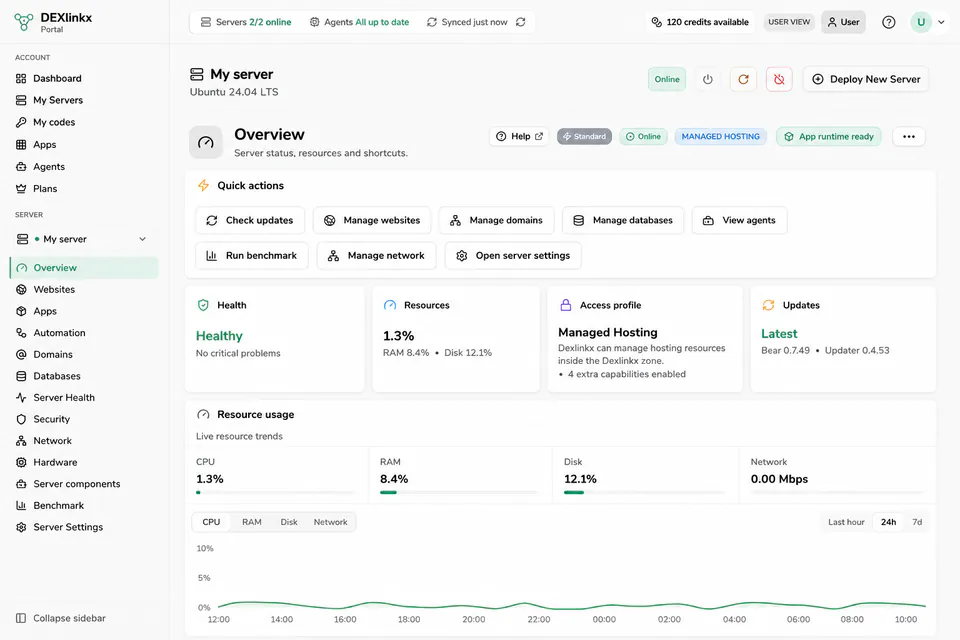
Guided installation
Install Dexlinkx on physical hardware or a virtual machine with a guided workflow.
Install a physical or virtual server and manage websites, apps, databases, networking and system actions with Dexlinkx.
Your files and databases stay on your server.
Install Dexlinkx on physical hardware or a virtual machine with a guided workflow.
Websites, databases, files and applications are stored on your own server.
View status, install services and run permitted server actions from the portal.
Go from a new server to one clear management interface with a guided setup.
Create your account and add the server you want to install or connect.
Follow the guided flow for physical hardware, a VM or compatible Linux server.
View status and use the features allowed by the server's access profile.
The essential tools for installing, monitoring and managing what runs on your server.
Create and manage static websites, PHP, WordPress and Laravel.
Manage Dexlinkx-owned databases and users through a guided workflow.
Install supported apps and services inside the Dexlinkx-managed area.
See connectivity, health and resource use in one place.
Connect domains and follow relevant network and SSL states.
Run permitted actions according to the access profile and available capabilities.
Run static websites, PHP, WordPress and Laravel on your own server.
Create a server for projects, testing and AI-developed websites.
Use physical hardware, a virtual machine or a compatible small server.
Dexlinkx acts as a control plane. Local server policy keeps the final boundary around what the platform may manage.
Read about access profilesDexlinkx will launch as a closed beta. You can apply now, and approved beta users will receive access in stages. Some areas are still evolving and may change during beta.
For now, documentation is available only to signed-in beta users. It will open to everyone later.
Apply for beta accessShort answers about how the platform works and what beta supports.
Dexlinkx is a control plane for your own server. Connect your server and manage websites, apps, databases, networking and permitted system actions from the portal.
They stay on your own server. The Dexlinkx portal does not store your website files or customer databases.
No. Common workflows are guided, although basic server knowledge remains useful for troubleshooting and you can still use SSH.
Yes. Dexlinkx Manager can help prepare a virtual machine, compatible physical hardware or an existing Linux server.
Static websites, PHP, WordPress and Laravel, along with frontend apps that can be published statically.
Dexlinkx is under active development. Core workflows work today, but some parts may change or have limitations during beta.
Your server and workloads remain with you. Portal controls and new remote actions may be unavailable until connectivity returns.
The beta is launching soon. Apply for access and install your first server with Dexlinkx Manager once your account is approved.